Add Your Vehicle to Inventory


Inventory Management is simple.

Log on:

Add vehicles to the inventory using our proprietary VIN decoder or import vehicles from your Third-Party Provider.

  • Click to add photos.
  • Click to print window stickers or buyer’s guides.

Add a vehicle using the VIN Decode Feature:

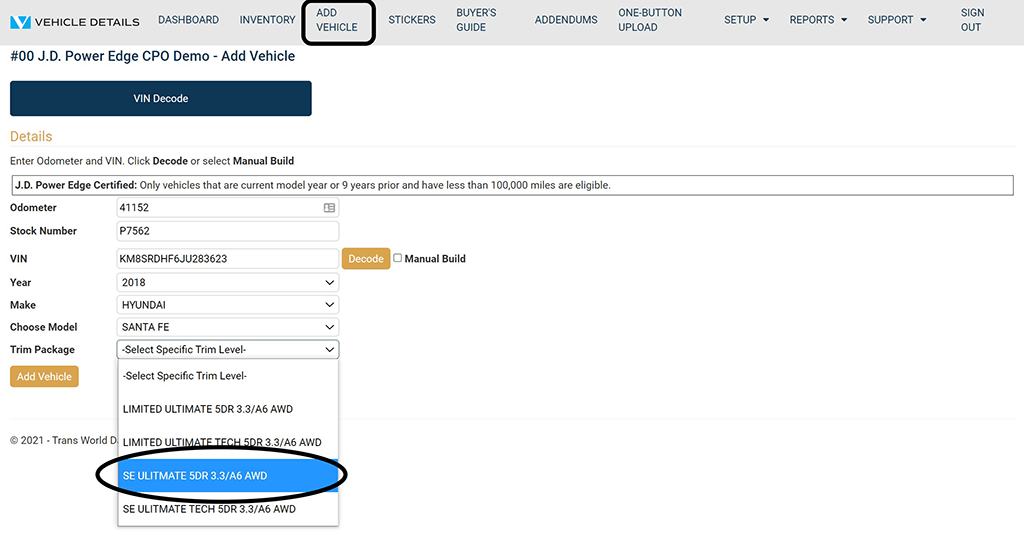
  • Enter Odometer, Stock # and VIN, then click Decode.
  • Choose the correct vehicle if you are given a choice.
  • Click Add Vehicle to go to the Vehicle Edit screen.

VIN Decode

Vehicle Details VIN Decode

Edit Vehicle Details:

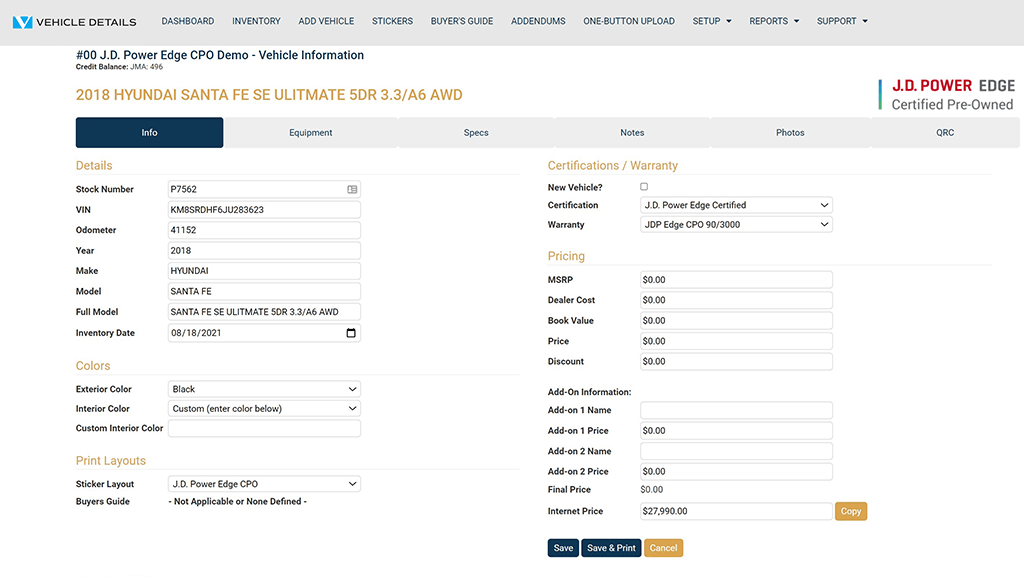
  • Enter key attributes: Interior & Exterior Color, Price & Internet Price.
  • Internet Price will be used for the QR Code-generated Vehicle Listing URL.
  • Use the tabs to navigate within the vehicle edit screen to continue editing equipment, specifications, and dealer comments.
  • Click Photos to Add Photos.
  • Click Save to save all your vehicle information.
  • You can return to the Vehicle Build Screen to add photos or modify any vehicle information that was just added.

Vehicle Edit Screen

Vehicle Details Edit Screen

Program Manuals

NATIONAL PROGRAM NEW YORK PROGRAM

Contact your JM&A Group Representative at jmacustomerservice@jmagroup.com

Contact Us

For Inventory Management and Window Sticker Application Technical Support,
9:00 AM to 4:00 PM Central Time, Monday through Friday, please call:

Phone: (262) 240-9652

Email: support@vehicledetails.com

Ticket System: support.vehicledetails.com

For claims regarding the Limited Warranty, please call or fax: (800) 327-5172.

To order Limited Warranty forms, Buyers Guides or J.D. Power® Edge Pre-Owned* Program marketing materials, please call: (888) JMA-FORMS.

For billing questions, please call: (800) 443-9841 and press 6.