Setting Up The Application

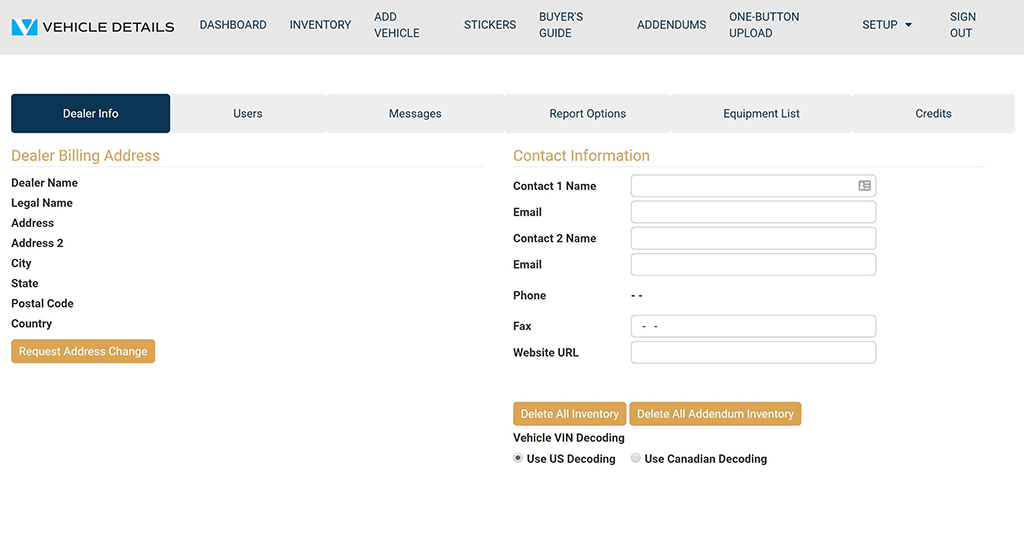
Most of the Dealer Information section of the program will be set up for you. Visit each tab on the dealer setup screen to ensure that the application is configured properly. There are key pieces of information that you will need to complete. If any of your Dealership Information is listed incorrectly, please use the button provided to Request Address Change.

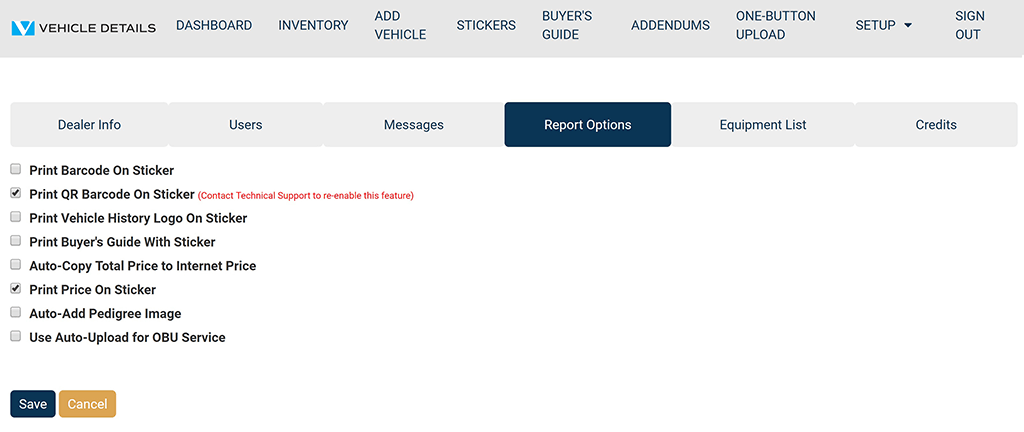
The QR Code Feature will be enabled for all dealers. This means that for every vehicle saved to your J.D. Power® Edge Certified Pre-Owned* Inventory, you can print the QR Code on the Monroney Window Sticker. If you choose to opt-out of using the QR Code Feature, please contact VehicleDetails.com Technical Support at (262) 240-9652 and the feature will be removed from your account.

Dealer Set-Up

Click on Dealer Info to add important information.

Add Contact Name.

Add Email Address: All vehicle inquiries generated from the QR Codes will be sent to the email address you have saved to your account.

Add Website: Add your dealership website here to appear on QR Code-generated Vehicle Listing URL.

Visit Report Options Tab to set up Account Options.

Vehicle Details Dealer Information
Vehicle Details Reporting Options

Program Manuals

NATIONAL PROGRAM NEW YORK PROGRAM

Contact your JM&A Group Representative at jmacustomerservice@jmagroup.com
Contact Us

For Inventory Management and Window Sticker Application Technical Support,
9:00 AM to 4:00 PM Central Time, Monday through Friday, please call:

Phone: (262) 240-9652

Email: support@vehicledetails.com

Ticket System: support.vehicledetails.com

For claims regarding the Limited Warranty, please call or fax: (800) 327-5172.

To order Limited Warranty forms, Buyers Guides or J.D. Power® Edge Pre-Owned* Program marketing materials, please call: (888) JMA-FORMS.

For billing questions, please call: (800) 443-9841 and press 6.